Copyable. Business-ready.Schedule meetings across timezones.
For people who schedule across continents — recruiters, executive assistants, and distributed teams.
The meeting time you can paste
Add your cities
Search any city or timezone abbreviation — PST, IST, GMT — and compare up to 10 zones side by side.
Find the overlap
Slide to any time and watch office-hours badges update in every zone. Green means everyone is at their desk.
Copy & paste
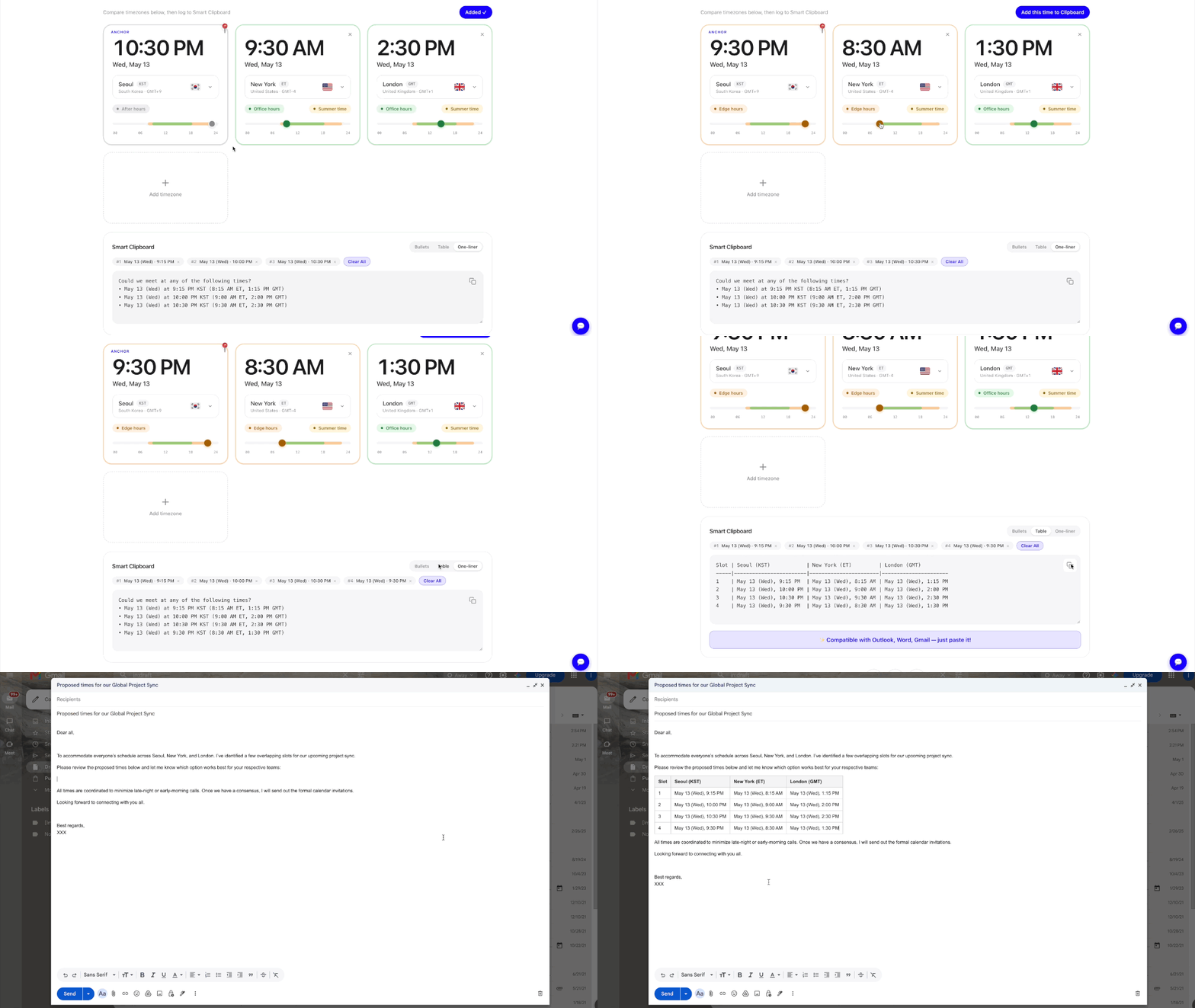
Log candidate times, pick Bullets, Table, or One-liner, and paste a business-ready schedule into email or Slack.
See it in 15 seconds
From “what time works for Seoul, New York, and London?” to a pasted email — in one flow.
Smart Clipboard
Three copy formats — bullets for Slack, a real table for Gmail/Outlook/Word, and a polite one-liner for quick asks. Every format is editable before you copy.
Working-hours intelligence
Office, edge, after-hours, and weekend detection for every zone, plus an at-a-glance verdict: “Works for everyone” or who exactly it breaks for.
Calendar export & share links
Create a Google Calendar event, download an .ics file, or copy a link that restores your exact zones and chosen time for teammates.
Private by design
No sign-up, no cookies, no personal data. Everything runs in your browser on live IANA time zone data, including DST handling.
Popular time zone conversions
Jump straight to a pre-configured converter with the current time difference, an hour-by-hour table, and meeting-overlap guidance.
Frequently asked questions
How do I convert a meeting time between time zones?+
Add the cities you work with, pick a date and time, and ez-timezone shows the local time in every zone at once — with office-hours badges so you can see instantly whether the slot works for everyone.
How do I share meeting times across time zones by email or Slack?+
Log one or more candidate times to the Smart Clipboard, choose Bullets, Table, or One-liner, and copy. The table format pastes as a real formatted table into Gmail, Outlook, and Word.
What is the best time for a meeting between the US and Europe?+
Morning in the US Eastern time zone (9–11 AM ET) overlaps with mid-afternoon in most of Europe (3–5 PM CET), which keeps both sides inside office hours. ez-timezone highlights these overlap windows automatically.
Does ez-timezone handle daylight saving time (DST)?+
Yes. All conversions use live IANA time zone data through your browser, so DST transitions in any country are always reflected correctly, and active summer time is flagged with a badge.
Is ez-timezone free?+
Yes — it's free, with no sign-up. Compare up to 10 time zones, save zone sets, and compose in Gmail/Outlook in one click.
Do I need an account?+
No. There is no sign-up, no login, and no personal data collection. Your selected zones stay on your device.
Can I export a meeting to my calendar?+
Yes — one click creates a Google Calendar event or downloads an .ics file for Apple Calendar and Outlook, and you can copy a share link that restores the exact zones and time you picked.